
Aimfox vs OutFlo
OutFlo vs Aimfox: AI-native LinkedIn outbound for agencies & GTM teams that need programmable control at scale
Aimfox is built for launching predefined campaigns quickly. OutFlo is built for agencies that need to adapt sequences, manage individual leads, and run every client’s outreach operation through MCP—from creating campaigns and rebuilding workflows to working the inbox, diagnosing performance, recovering accounts, and applying changes through natural-language instructions.
Where should you start?
Choose your workflow to jump to the section that matters most.
You need behavior-based workflow control across client accounts, sender profiles and handoffs.
01 · Campaign workflow control
Outreach should not run as a fixed checklist. The next action should depend on what the lead actually did.
Aimfox has a campaign-flow builder with configurable actions, but it presents outreach as a predefined flow:
View profile → Connection request → React to a post → Message sequence → Endorse a skill → Withdraw connection request
OutFlo lets agencies design the decision logic connecting those actions:
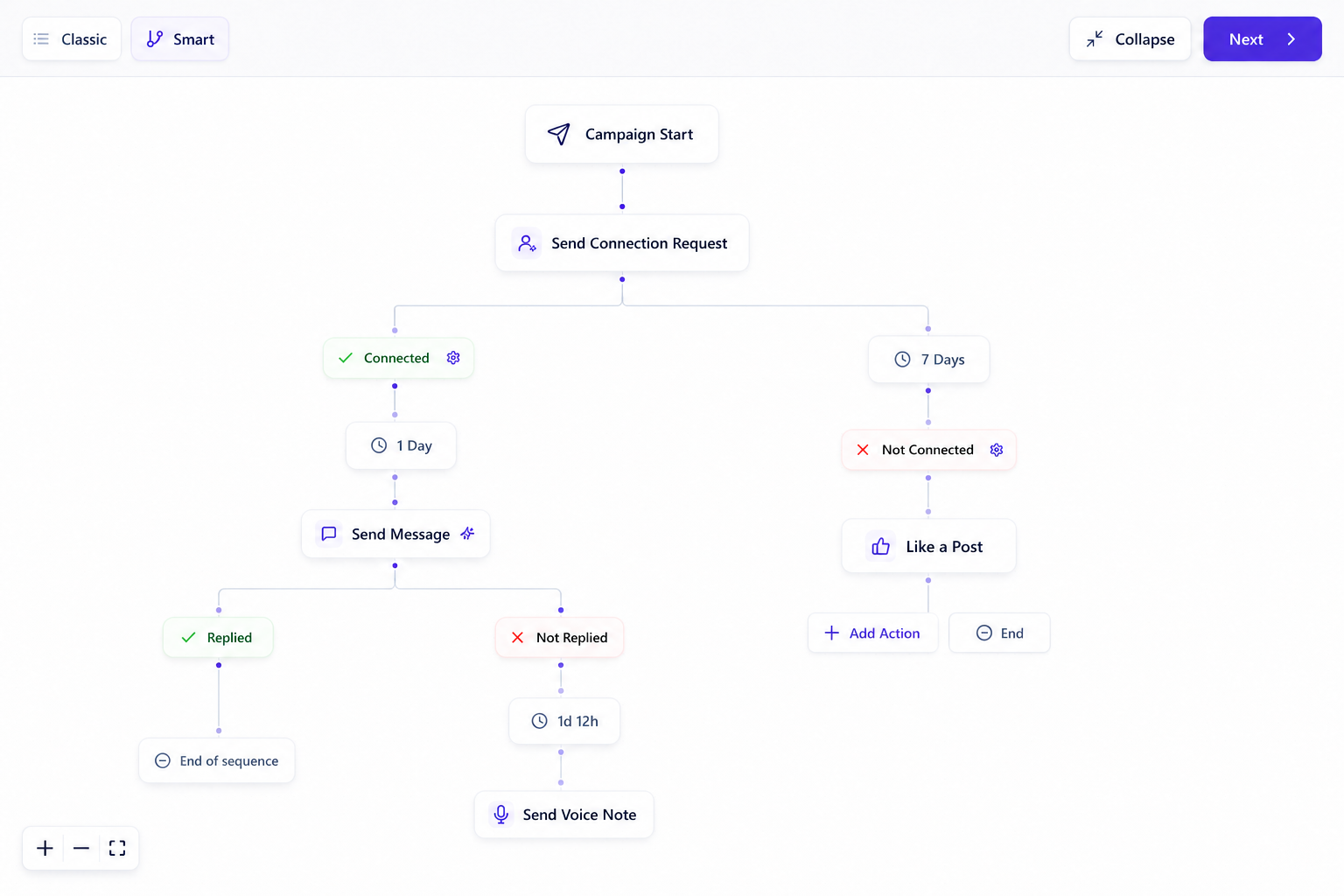
If connected → send a message. If not connected → send a connection request. If accepted → continue the conversation. If ignored → follow another branch. If replied → stop automation and hand over to a human.
What changes
Aimfox helps configure campaign actions. OutFlo lets you design behavior-based paths where each lead moves to the next action based on connection status, acceptance, reply, profile state or a previous action.
The practical edge
With OutFlo, the agent can build and modify a graph such as: check connection → message if connected → request if not connected → like a post if accepted → follow or use Free InMail if not accepted or open → stop or route differently when the lead replies.
02 · Inbox synchronization and reliability
When replies disappear or campaign state drifts, the outreach may be running—but the operator cannot trust the operating picture.
Users have reported:
- Replies not appearing
- Inbox synchronization working inconsistently
- Messages from outside campaigns being counted as campaign responses
- Campaigns stopping for extended periods
- The product breaking again after temporary fixes
- Slow or sluggish system performance
- Minor messages not displaying correctly
Underlying problem
An agency cannot reliably decide which lead needs a response when the inbox and campaign state do not stay synchronized.
How OutFlo addresses it
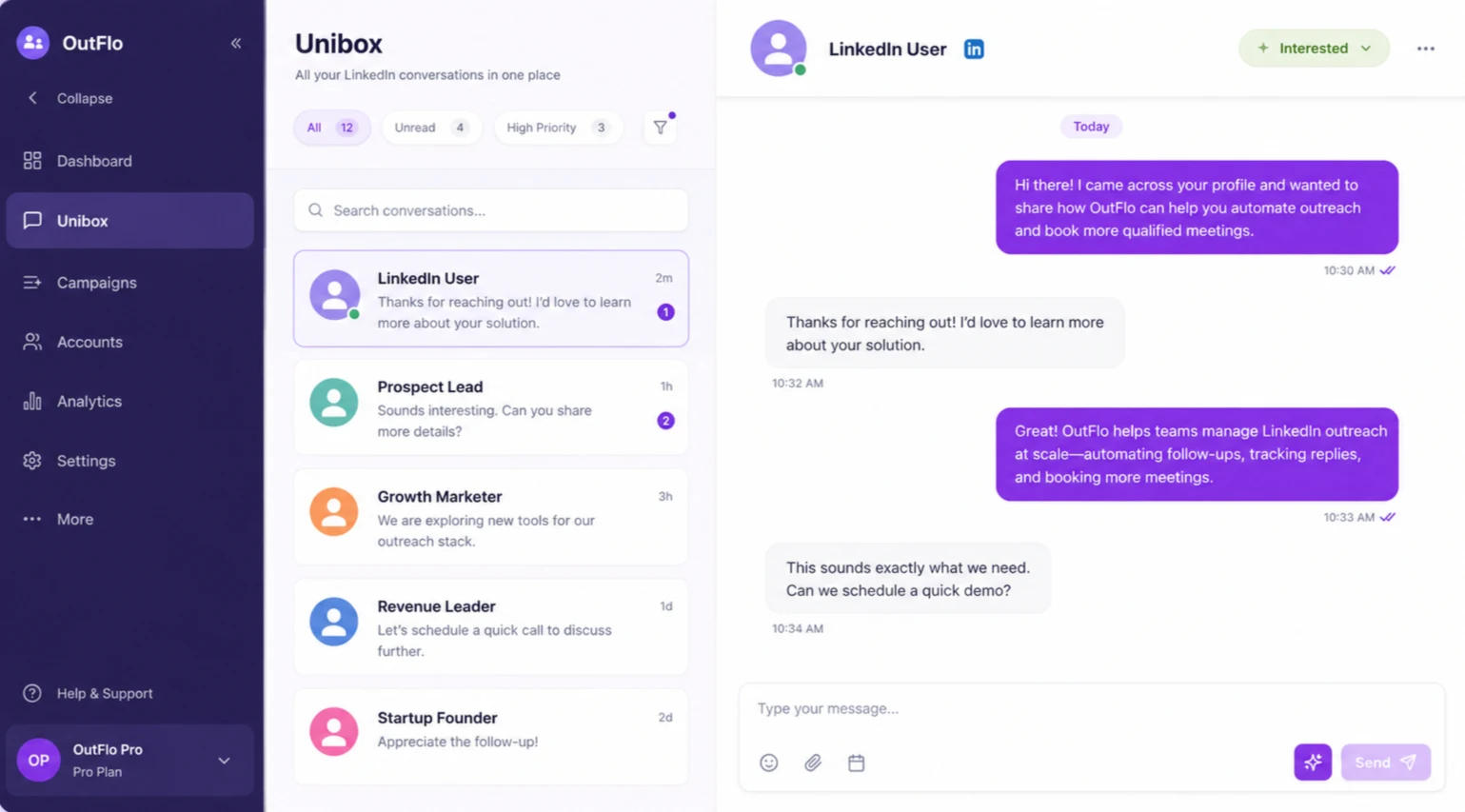
OutFlo brings conversations, campaign state, lead history and handoff decisions into one operating layer. The goal is not only to send the next message, but to make it clear what happened, what is running and which conversation needs a person.
The experience may vary by account and workflow; some users also describe Aimfox as stable. The comparison point is the operational cost when inbox synchronization is not dependable.
03 · MCP
Aimfox MCP is a toolbox. OutFlo MCP connects the outreach engine, workflow builder, inbox, analytics layer and safety system.
With Aimfox, an agent can perform separate actions:
“List campaigns.”
“Show leads.”
“Send a message.”
With OutFlo, it can connect those actions:
“Find leads who replied, check their campaign step, tag them, pause follow-ups, and show me who needs a human response.”
Aimfox provides individual tools. OutFlo connects them into one outreach workflow. It is designed around the complete GTM process: inspect the campaign, understand the sequence, trace the lead history, analyze the funnel, control individual leads, handle account checkpoints, and act only after the relevant context is available.
Personalization with missing-data behavior
OutFlo can use live LinkedIn context and decide whether to skip a lead, send a blank value or use a defined fallback when recent activity is unavailable, instead of silently producing broken copy.
Hosted voice notes
OutFlo MCP supports adding hosted audio files directly into outreach workflows. “Add this hosted audio file as the third step in the sequence.” OutFlo fetches and processes the URL, then adds the voice note through MCP.
Inspect → understand → decide → act
OutFlo is designed around the actual GTM decision loop: read the campaign, inspect replies, identify interested leads, classify conversations and pause follow-ups only for leads needing human handling.
Performance diagnosis
Aimfox shows campaign performance. OutFlo lets teams trace performance down to the sender, funnel stage, sequence step and tag to help identify where and why performance is changing.
The strongest distinction
Aimfox lets an AI agent operate campaign records. OutFlo lets the agent understand and rebuild the campaign workflow. “Read the sequence, add a connection check, create accepted and ignored-request branches, update the messages, pause the campaign, and relaunch it.”
MCP capability map
The difference is in the workflow depth.
This table separates the OutFlo capabilities from the Aimfox MCP functions covered in the comparison research.
| OutFlo capability | Why it matters | Aimfox MCP |
|---|---|---|
| Full Smart Sequence returned as structured JSON | The AI can understand every node, branch, delay, and exact message before making changes | Not available |
| Rewrite the entire sequence graph through MCP | Agents can build and restructure complex branching workflows | Not available |
| Branching logic with LinkedIn behavior conditions | The workflow can react to connection status, acceptance, replies, profile state, and action outcomes | Campaign flows exist, but MCP-level branching control is not documented |
| Pause → edit → resume workflow | Prevents live sequence corruption and makes changes deliberate | Not available |
| Server-side protection for in-flight sequence edits | Protects leads already moving through a campaign | Not available |
| Campaign status plus computed dynamic status | Separates user-set state from actual lead-pipeline state | Not available |
| Individual lead timeline containing actions and messages | Lets the agent understand exactly what happened to a prospect | Aimfox lists engagement history, but not this specific merged campaign timeline |
| Pause/resume/exclude individual leads | Stops one lead without stopping the entire campaign | Not available |
| Hosted voice-note URL through MCP | Add external audio without manually recording in the dashboard | Not available |
| Voice-file transcoding and rehosting | Makes hosted audio usable inside the outreach workflow | Not available |
| Update campaign schedule after creation through MCP | Lets teams change timezone and operating hours without rebuilding the campaign | Not available |
| Read schedule back after update | Allows verification that the schedule actually saved | Not available |
| Sequence-step analytics | Shows where the workflow succeeds or loses prospects | Not available |
| Funnel analytics | Shows performance by stage rather than only campaign totals | Not available |
| Sender-level analytics | Identifies weak or underperforming LinkedIn accounts | Not available |
| Timeseries analytics | Shows performance changes over time | Not available |
| Tag analytics | Connects conversation classification to campaign performance | Not available |
| Read conversation, then tag based on content | Supports a human-reviewed inbox workflow instead of blind automation | Aimfox has labels, but this content-first workflow is not documented |
| Account reconnect plus OTP checkpoint solving | Recovers connected accounts without exposing a destructive disconnect action | Not available |
| Multi-step MCP workflows across campaign, lead, inbox, and analytics | One prompt can inspect, modify, verify, and report across the operating system | Aimfox documentation emphasizes individual API-style tools |
04 · Pricing
Compare the account model before the headline price.
OutFlo prices the connected LinkedIn operating layer. Aimfox prices Outreach by seat, with one seat for each active LinkedIn account; its Agency plan and Avatar rental are separate pricing models.
OutFlo pricing
$39
per account, per month
Aimfox Outreach one-account price
$49
per seat, per month
OutFlo's 25-account Booster is $700/month ($28/account). At 50 accounts, it is $1,050/month ($21/account).
Aimfox's Outreach seat is tied to an active LinkedIn account. Its Agency plan starts at $499 for 20 seats, with additional seats priced separately; Avatar rentals are separate from Outreach seats.
| Connected accounts | Aimfox | OutFlo | What changes |
|---|---|---|---|
| 1 | $49/month Outreach seat | $39/month | OutFlo is lower for one connected account |
| 5 | $245/month for 5 seats | $195/month | Both models scale with connected LinkedIn accounts; OutFlo keeps the operating unit explicit |
| 10 | $490/month for 10 seats | $390/month | OutFlo remains lower on the connected-account subscription |
| 25 | $599/month at Agency pricing | $700/month Booster ($28/account) | Aimfox Agency pricing starts with 20 seats; OutFlo's Booster bundles 25 accounts |
| 50 | $1,099/month at Agency pricing | $1,050/month ($21/account) | OutFlo is lower at this scale before any separate account-rental choice |
Aimfox Agency
$499/month for 20 seats, plus $20 for each additional seat.
Aimfox Avatar
$129 per profile per month, billed quarterly, separate from Outreach seats.
Pricing reference: Aimfox pricing and Aimfox plan details.
05 · Campaign and lead controls
When a campaign is live, agencies need to control the individual lead—not only the campaign toggle.
Users specifically complained that they could not easily:
- Add new leads to an active campaign
- Pause or remove an individual lead
- Prevent a lead from receiving the next message
- Add notes to connection requests
- Enroll the same lead in multiple campaigns
- Run one campaign across multiple LinkedIn users
Underlying problem
When an agency needs to correct a campaign while it is live, the system does not always provide enough granular control.
How OutFlo addresses it
OutFlo supports campaign and lead operations as separate decisions: pause, resume or exclude one lead without stopping the campaign, inspect an individual timeline containing actions and messages, read the conversation, tag based on content and hand the valuable reply to a human.
This is a stronger agency comparison than a generic UI claim: the difference is whether a team can correct the live workflow at the level where the mistake happened.
06 · LinkedIn account rental
Real-person profiles give agencies a stronger foundation for long-term credibility and continuity.
Aimfox rents “Avatar” profiles created and controlled by Aimfox. They are not associated with real people, and key identity fields such as the name, profile photo and location cannot be changed. If an Avatar is banned, Aimfox replaces it, but the replacement is still a new profile that may need to rebuild its history, trust, connections and campaign momentum.
OutFlo provides verified real-person LinkedIn accounts sourced through trusted vendors:
- Indian accounts: $115/account/month
- US accounts: $150/account/month
- Profile personalization
- Account ramp-up process
- Replacement support if an account is restricted or banned
Why this matters
When an Avatar is replaced after a ban, the replacement may not carry over the original profile's accumulated history, connections, trust and campaign momentum. If the profile had already been running for two or three weeks, an agency may have to start building that progress again.
OutFlo's model
OutFlo's rental fee covers the account itself. The OutFlo subscription separately covers the workspace, automation, inbox, sequences and platform access. Rented profiles can be customized with a banner, headline, About section, current job, role, skills and profile picture.
Aimfox's Avatar details: official Avatar help article.
07 · The right fit
Choose the operating model that matches the job.
Choose Aimfox when the buyer wants to launch predefined LinkedIn campaign flows quickly and operate a broad set of individual automation actions.
Choose OutFlo when the buyer is an agency or GTM team that needs the right balance: programmable sequence logic, AI personalization with explicit missing-data behavior, one inbox, campaign and lead control, sender and funnel diagnosis, MCP workflows and human takeover when the conversation becomes valuable.
The core distinction is simple: Aimfox provides campaign automation tools. OutFlo provides an AI-assisted outreach operating system that can inspect and rebuild the workflow while keeping the salesperson in control.
Every tool looks similar on paper.
The useful differences show up after launch: who controls the workflow, who can see the reply and who can correct the individual lead.
Campaign logic
Design behavior-based paths instead of a fixed action checklist.
02Inbox reliability
Keep replies, campaign state and handoffs visible in one operating picture.
03MCP depth
Inspect, modify, verify and report across the campaign, lead, inbox and analytics layers.
04Pricing
Compare seat pricing with OutFlo's connected-account model at agency scale.
05Lead controls
Pause, resume or exclude an individual lead while the campaign keeps running.
06Account rental
Compare Aimfox Avatars with OutFlo's verified real-person account model.
07Founder support
Get a direct path to review the workflow, copy and operating decision when the motion matters.

The people you deal with
When you run an agency, support is part of the operating system.
Client workflows rarely stay static. The campaign, inbox and account context need to remain understandable when the ICP, offer or reply changes.
OutFlo gives agencies a direct operating layer for campaign reviews, copy changes, workflow decisions and the human handoff after a prospect shows interest.
08 · Frequently asked questions
Before you switch
Aimfox is designed around launching and operating predefined campaign flows. OutFlo is built for agencies and GTM teams that need programmable control over sequences, individual leads, inbox work and campaign diagnosis.
Give your agency programmable AI leverage without giving up the conversation.
Run the workflow in one workspace, then let the right person take over when it matters.